Hiển thị các bài đăng có nhãn JQuery. Hiển thị tất cả bài đăng
How to create dynamic row and column in html?
tháng 2 08, 2016 / in HTML, JQuery / with No comments /
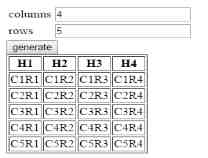
In the following example, just I created two text box input for getting the number of column and rows and when you click the generate button the dynamic table will create.
Note:
If you have any doubt about this example please type comments below, ill help you.
Example Program:- (Editor)

Editor is Loading...
Output:-
Advertisement
Tags:
Dynamic create rows and columns in allinworld99, allinworld99 to create dynamic table. Create rows and columns dynamically
Note:
If you have any doubt about this example please type comments below, ill help you.
Example Program:- (Editor)
Editor is Loading...
Output:-
Advertisement
Tags:
Dynamic create rows and columns in allinworld99, allinworld99 to create dynamic table. Create rows and columns dynamically
back and next button in html
tháng 2 08, 2016 / in HTML, JQuery / with No comments /
In the following code can use show your div one by one when clicking on the next or back button, just I wrote the main program. Copy the code and you can change the design.
Example
In the following example just I used 7 div, you can used more div by the changing the class name like page-1, page-2, page-3, page-4, page-5, page-6, page-7, page-8, page-9, etc..
Example Program:- (Editor)

Editor is Loading...
Output:-
Advertisement
Tags:
back and next button in allinworld99, In div back and next button, page by page moving using jquery.
Example
In the following example just I used 7 div, you can used more div by the changing the class name like page-1, page-2, page-3, page-4, page-5, page-6, page-7, page-8, page-9, etc..
Example Program:- (Editor)
Editor is Loading...
Output:-
Advertisement
Tags:
back and next button in allinworld99, In div back and next button, page by page moving using jquery.
show and hide a div in single button using jquery
tháng 2 04, 2016 / in JQuery / with No comments /
jQuery two methods for show and hide a div, but in some time we need to do the process from a single button there we can use toggle() method.
syntax
Example
Example Program:- (Editor)

Editor is Loading...
Output:-
Advertisement
Tags:
toggle() in allinworld99, show/hide using single button in allinworld99, jQuery in allinworld99
syntax
$("selector").toggle();Example
$("#idname").toggle(); Example Program:- (Editor)
Editor is Loading...
Output:-
Advertisement
Tags:
toggle() in allinworld99, show/hide using single button in allinworld99, jQuery in allinworld99
How to change the button text using jquery
tháng 12 30, 2015 / in JQuery / with No comments /
val() is used to change the button text value, in the following example we are used two buttons and change its text dynamically when pressing on the button.
Same Example in JavaScript Click Here
Example Program:- (Editor)

Editor is Loading...
Output:-
Advertisement
Same Example in JavaScript Click Here
$("#btnid").val("Second Button");Example Program:- (Editor)
Editor is Loading...
Output:-
Advertisement
Convert to lower case letter using javascript/jquery
tháng 12 29, 2015 / in javascript, JQuery / with No comments /
How to create tab design?
tháng 12 24, 2015 / in JQuery / with No comments /
jQuery have default design for tabs. We need to import the jquery plugin and jQuery UI plugin then only the tabs() method works properly with good design.
A single content area with multiple panels, each associated with a header in a list.
Example Program:- (Editor)

Editor is Loading...
Output:-
Advertisement
A single content area with multiple panels, each associated with a header in a list.
Example Program:- (Editor)
Editor is Loading...
Output:-
Advertisement
slice in jQuery simpla example
tháng 12 22, 2015 / in JQuery / with No comments /
Given a jQuery object that represents a set of DOM elements, the .slice() method constructs a new jQuery object containing a subset of the elements specified by the start and, optionally, end argument. The supplied start index identifies the position of one of the elements in the set; if end is omitted, all elements after this one will be included in the result.
Example Program:- (Editor)

Editor is Loading...
Output:-
Advertisement
Example Program:- (Editor)
Editor is Loading...
Output:-
Advertisement
Đăng ký:
Bài đăng (Atom)


