How to set multiple images in a loop javascript?
tháng 8 13, 2016 / in javascript / with No comments /
Create Image tag using javacript
Usually we are directly create the html tag in the html code, but if you want to create this img tag dynamically you can follow the below code.
var img = document.createElement("img");
img.src = "http://www.google.com/intl/en_com/images/logo_plain.png";
var src = document.getElementById("elementid");
src.appendChild(img);Set multiple images in a loop
If you want to add only one image, you can follow the above method. If you want to append more images dynamically you can follow the below method.
Example Program:- (Editor)
Editor is Loading...
Output:-
Advertisement
How can I find dynamically trigger or native change from function?
tháng 6 02, 2016 / in javascript / with No comments /
Create Simple Notepad using javascript
tháng 5 19, 2016 / in javascript / with No comments /
Move up and down listbox item using javascript
tháng 5 12, 2016 / in javascript / with No comments /
Example
function listboxMove(listID, direction) {
var listbox = document.getElementById(listID);
var selIndex = listbox.selectedIndex;
if (-1 == selIndex) {
alert("Please select an option to move.");
return;
}
var increment = -1;
if (direction == 'up')
increment = -1;
else
increment = 1;
if ((selIndex + increment) < 0 ||
(selIndex + increment) > (listbox.options.length - 1)) {
return;
}
var selValue = listbox.options[selIndex].value;
var selText = listbox.options[selIndex].text;
listbox.options[selIndex].value = listbox.options[selIndex + increment].value
listbox.options[selIndex].text = listbox.options[selIndex + increment].text
listbox.options[selIndex + increment].value = selValue;
listbox.options[selIndex + increment].text = selText;
listbox.selectedIndex = selIndex + increment;
} Example Program:- (Editor)
Editor is Loading...
Output:-
Advertisement
Select all values from list box in a single click using javascript
tháng 5 12, 2016 / in javascript / with No comments /
function listboxSelectDeselect(listID, isSelect) {
var listbox = document.getElementById(listID);
for (var count = 0; count < listbox.options.length; count++) {
listbox.options[count].selected = isSelect;
}
}Example Program:- (Editor)
Editor is Loading...
Output:-
Advertisement
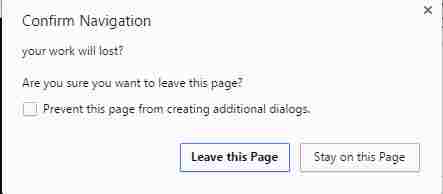
Warn the user if leave the current page using javascript
tháng 5 12, 2016 / in javascript / with No comments /
Example
window.onbeforeunload = function() {
return "Are you sure to go back?";
};Example Program:- (Editor)
Editor is Loading...
Output:-
Advertisement
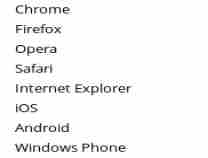
How to find the device mobile or pc using javascript?
tháng 5 07, 2016 / in Cordova, javascript / with No comments /
The following method will return the useragent full details.
navigator.userAgentYou can find is this is mobile device or not using the following code
/(ipad|iphone|ipod|android|windows phone)/i.test(navigator.userAgent)Mostly we need to check it for cordova mobile application, because we need to check it in desktop pc or in normal browser and mobile native application, in that situation we can check like below.
if(( /(ipad|iphone|ipod|android|windows phone)/i.test(navigator.userAgent) ))
{
cordova.plugins.Keyboard.close();
}In the above method is only working in mobile, we can't run cordova methods in PC.
Example Program:- (Editor)
Editor is Loading...
Output:-
Advertisement
set and get multiple values from drop down list using javascript
tháng 5 02, 2016 / in javascript / with No comments /
Convert image or word or pdf files to data url using javascript
tháng 5 02, 2016 / in javascript / with No comments /
Example Program:- (Editor)
Editor is Loading...
Output:-
Advertisement
Extra small numbers in javascript
tháng 4 16, 2016 / in javascript, javascript Beginner / with No comments /
How to convert Hexadecimal, octal,binary
tháng 4 13, 2016 / in javascript, javascript Beginner / with No comments /
Syntax
variable.toString() //convert to String
variable.toString(2) //convert to Binary
variable.toString(8) //convert to Octal
variable.toString(16) //convert to HexadecimalExample
var num=66;
num.toString(); //return "66"
num.toString(2); //return "1000010"
num.toString(8); //return "102"
num.toString(16); //return "42" Example Program:- (Editor)
Editor is Loading...
Output:-
Advertisement
parseInt() in javascript
tháng 4 11, 2016 / in javascript, javascript Beginner / with No comments /
Syntax
parseInt(string, radix);string
The value to parse. If string is not a string, then it is converted to a string (using the ToString abstract operation). Leading whitespace in the string is ignored.
radix
An integer between 2 and 36 that represents the radix (the base in mathematical numeral systems) of the above mentioned string. Specify 10 for the decimal numeral system commonly used by humans. Always specify this parameter to eliminate reader confusion and to guarantee predictable behavior. Different implementations produce different results when a radix is not specified, usually defaulting the value to 10.
Description
The parseInt function converts its first argument to a string, parses it, and returns an integer or NaN. If not NaN, the returned value will be the decimal integer representation of the first argument taken as a number in the specified radix (base). For example, a radix of 10 indicates to convert from a decimal number, 8 octal, 16 hexadecimal, and so on. For radices above 10, the letters of the alphabet indicate numerals greater than 9. For example, for hexadecimal numbers (base 16), A through F are used.
If parseInt encounters a character that is not a numeral in the specified radix, it ignores it and all succeeding characters and returns the integer value parsed up to that point. parseInt truncates numbers to integer values. Leading and trailing spaces are allowed.
- If radix is undefined or 0 (or absent), JavaScript assumes the following:
- If the input string begins with "0x" or "0X", radix is 16 (hexadecimal) and the remainder of the string is parsed.
- If the input string begins with "0", radix is eight (octal) or 10 (decimal). Exactly which radix is chosen is implementation-dependent. ECMAScript 5 specifies that 10 (decimal) is used, but not all browsers support this yet. For this reason always specify a radix when using parseInt.
- If the input string begins with any other value, the radix is 10 (decimal).
- If the first character cannot be converted to a number, parseInt returns NaN.
For arithmetic purposes, the NaN value is not a number in any radix. You can call the isNaN function to determine if the result of parseInt is NaN. If NaN is passed on to arithmetic operations, the operation results will also be NaN.
To convert number to its string literal in a particular radix use intValue.toString(radix).
The following example return 15.
Example
parseInt(" 0xF", 16);
parseInt(" F", 16);
parseInt("17", 8);
parseInt(021, 8);
parseInt("015", 10);
parseInt(15.99, 10);
parseInt("15,123", 10);
parseInt("FXX123", 16);
parseInt("1111", 2);
parseInt("15*3", 10);
parseInt("15e2", 10);
parseInt("15px", 10);
parseInt("12", 13);The following example return NaN.
Example
parseInt("Hello", 8); // Not a number at all
parseInt("546", 2); // Digits are not valid for binary representationsThe following example return -15.
Example
parseInt("-F", 16);
parseInt("-0F", 16);
parseInt("-0XF", 16);
parseInt(-15.1, 10);
parseInt(" -17", 8);
parseInt(" -15", 10);
parseInt("-1111", 2);
parseInt("-15e1", 10);
parseInt("-12", 13);The following example return 224.
Example
parseInt("0e0", 16); Example Program:- (Editor)
Editor is Loading...
Output:-
Advertisement
parseFloat() in javascript
tháng 4 11, 2016 / in javascript, javascript Beginner / with No comments /
parseFloat(string);
parseFloat("3.14");
parseFloat("314e-2");
parseFloat("0.0314E+2");
parseFloat("3.14more non-digit characters"); Example Program:- (Editor)
Editor is Loading...
Output:-
Advertisement